
Get access to every one of the BBC’s 58 radio stations, right from your Dashboard! No need to keep a web browser open or run some memory-hungry application — just convenient listening, whenever you want it. Plus, discover daily schedules right inside the widget, a great Mac look-and-feel, and automatic updating.
System Requirements: Mac OS X 10.6 with Safari 4 or above is required.
Version 4.7 changes:
- Worked around latest BBC changes
- Station list can be updated without upgrading the widget
Designed for the Mac...
Small, but fully functional.

The BBC Radio Widget has a simple, clean design, with lots of visual feedback so you know what’s going on. It hides away all the complicated operation and makes connecting to the radio station of your choice as simple as playing a song in iTunes.
Everything is designed to be easy, logical and even pleasurable to use, so you can swap the hassle of hard-to-navigate websites for a tiny widget — one that remembers what station you were listening to, even if you close it.
...and designed for the BBC
Wondering what’s on? We’ve got you covered.
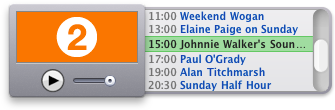
BBC Radio Widget is made solely for the BBC’s radio stations, so you get all kinds of benefits that generic players just can’t provide. Like schedule information for every station, in a handy drawer.
It’ll even show you what’s playing right now — and keep the display updated every minute of every day.
Mac OS X Snow Leopard v10.6 or greater, with Safari 4 or greater, is required. If (after extracting the widget from the .zip file) you receive a warning that the widget is from "an unidentified developer" when you try to run it, please ctrl-click the widget and choose "Open". This will allow you to choose to ignore this (harmless) warning and run the widget anyway.